
See where your money is going — and where your life can go next.
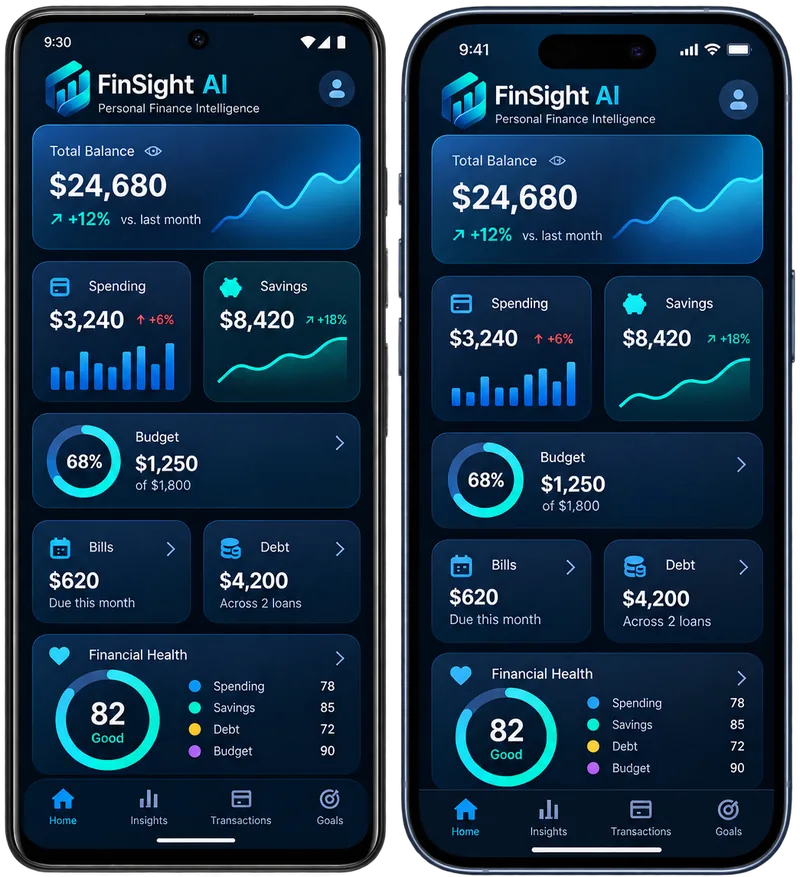
FinSight AI turns budgets, bills, spending, savings, and debt into one calm personal finance intelligence dashboard for individuals and families.
- Pause two streaming subscriptions you haven't used in 30 days. ~$24/mo.
- Move $150 to your Emergency Fund this Friday — keeps you on track.
- Internet bill due in 4 days. Reminder set.
Money feels scattered. Confidence shouldn't.
Bills land in different inboxes. Spending hides in different apps. Savings goals slip in silence. Debt feels like a black box. And money advice usually arrives wrapped in shame.
Email, calendars, sticky notes, autopay you can't quite remember setting up.
By the time the surprise hits, the month is already over.
Minimums feel safe. They aren't a plan.
A calm financial co-pilot for real life.
FinSight AI answers the five questions you actually have about money: How am I doing this month? Where is my money going? What bills are coming? Am I moving toward my goals? What should I do next?
Real income, real expenses, real net — no fake numbers, ever.
Set a goal, FinSight drafts a contribution plan from your real surplus.
Reminders, autopay tracking, and a calendar view that fits real life.
Snowball or avalanche, simulated against your real balances and APRs.
Six factors, each visible. No black box.
Six agents you can run on demand. Every recommendation is reviewable.
Six specialists. One co-pilot.
Each agent has a clear job, clear inputs, and a clear set of outputs you can accept or dismiss. They never move money on their own.
Drafts a realistic monthly budget from real income and patterns.
Spots category trends, lifestyle creep, and stale subscriptions.
Tracks due dates and warns when cash flow looks tight.
Turns goals into achievable contribution plans with milestones.
Compares snowball vs avalanche on your real debts.
Recomputes your transparent score and surfaces the next 3 actions.
A score that explains itself.
Six factors — budget consistency, spending control, bill reliability, savings progress, debt management, and cash-flow stability — each weighted, each visible. So you always know what changed and why.
- Transparent weights, visible math
- History so you can see momentum
- Top 3 actions, ranked by impact
Your data, treated like the sensitive thing it is.
Every record is scoped to your workspace. Cross-tenant access is impossible by design.
Financial details and tokens are encrypted at rest. Logs never include raw secrets.
Sensitive actions are logged. AI recommendations stay reviewable, never auto-applied.
Take FinSight with you
Install FinSight on your phone's home screen. No app store needed: it opens full screen like any other app. It needs a connection to show your figures, and your financial data is never stored on the phone.
- Opens from your home screen
- Easy navigation with one thumb
- Nothing private stored on the device
- 1Open finsightai.gg in Chrome
- 2Tap the ⋮ menu
- 3Choose “Install app” or “Add to Home screen”
- 1Open finsightai.gg in Safari
- 2Tap Share (the square with an arrow). On newer iPhones and iPads it's under the ⋯ button next to the address bar
- 3Scroll down (or tap View More) and choose “Add to Home Screen”
Practical money guides
Short, calm articles on budgeting, saving and paying off debt.
Start an emergency fund you'll actually keep
A small, boring pile of cash does more for your peace of mind than almost anything else. Here's how to start one when money already feels tight.
Read articleSnowball vs avalanche: two honest ways to pay off debt
Pay the smallest balance first, or the highest interest rate first? Both methods work. Here's how each one plays out, and how to choose between them.
Read articleHow to build your first budget (without a spreadsheet)
A budget isn't a diet for your money. It's a plan for what you want it to do. Here's a simple way to make your first one in under an hour.
Read articleQuestions, gently answered.
Do I need to link my bank?
No. You can use FinSight entirely with manual accounts and CSV imports. We'll add bank linking through licensed providers as a separate, opt-in feature.
Is FinSight a financial advisor?
No. FinSight provides educational organization and pattern insights. Decisions about investments, taxes, or borrowing should involve qualified professionals.
Can my partner share a workspace with me?
Yes. The Family plan supports multiple members, shared budgets, and joint goals — with role-based access for spouses, partners, and even teens.
Where does my data live?
In your tenant. Tenant isolation is enforced at the query layer, sensitive fields are encrypted at rest, and you can export or delete your data at any time.
Is there a mobile app?
FinSight AI runs in your browser on any phone, tablet or computer, and you can install it to your phone's home screen so it opens like an app: from Chrome, choose Install app; on iPhone, tap Share, then Add to Home Screen. It needs a connection to show your figures, and your financial data is never stored on the device.
Turn confusion into clarity. Today.
Start with empty states and real intent. FinSight will fill in the picture as your real data does.